✨ Core Workflow (Quy trình cốt lõi):
- Open your SketchUp model. / Mở mô hình SketchUp của bạn.
- Click the MiliStudio Library toolbar icon to launch the window. / Nhấp biểu tượng toolbar MiliStudio Library để mở cửa sổ.
- Go to File > Add Folder to link local model or material directories, or select Update Date Library to automatically decompress and register a new zip collection. / Vào trình đơn File > Add Folder để gắn thư mục cục bộ, hoặc chọn Update Date Library để tự động giải nén và đăng ký bộ sưu tập mới.
- Browse folders in the sidebar. Click on a component thumbnail to place it interactively, or right-click to choose insertion options (Insert at origin, Replace selected). / Duyệt thư mục bên sidebar. Nhấp chuột vào ảnh để chèn tương tác, hoặc nhấp chuột phải để chọn chèn tại gốc tọa độ, thay thế đối tượng đang chọn.
- Select the Material tab to apply premium wood textures. Adjust scale and texture dimensions easily using the support controls. / Chọn thẻ Material để áp vật liệu gỗ óc chó cao cấp. Dễ dàng hiệu chỉnh kích thước và tỉ lệ vân gỗ.
🌳 Hướng dẫn sử dụng chi tiết (Detailed User Guide):
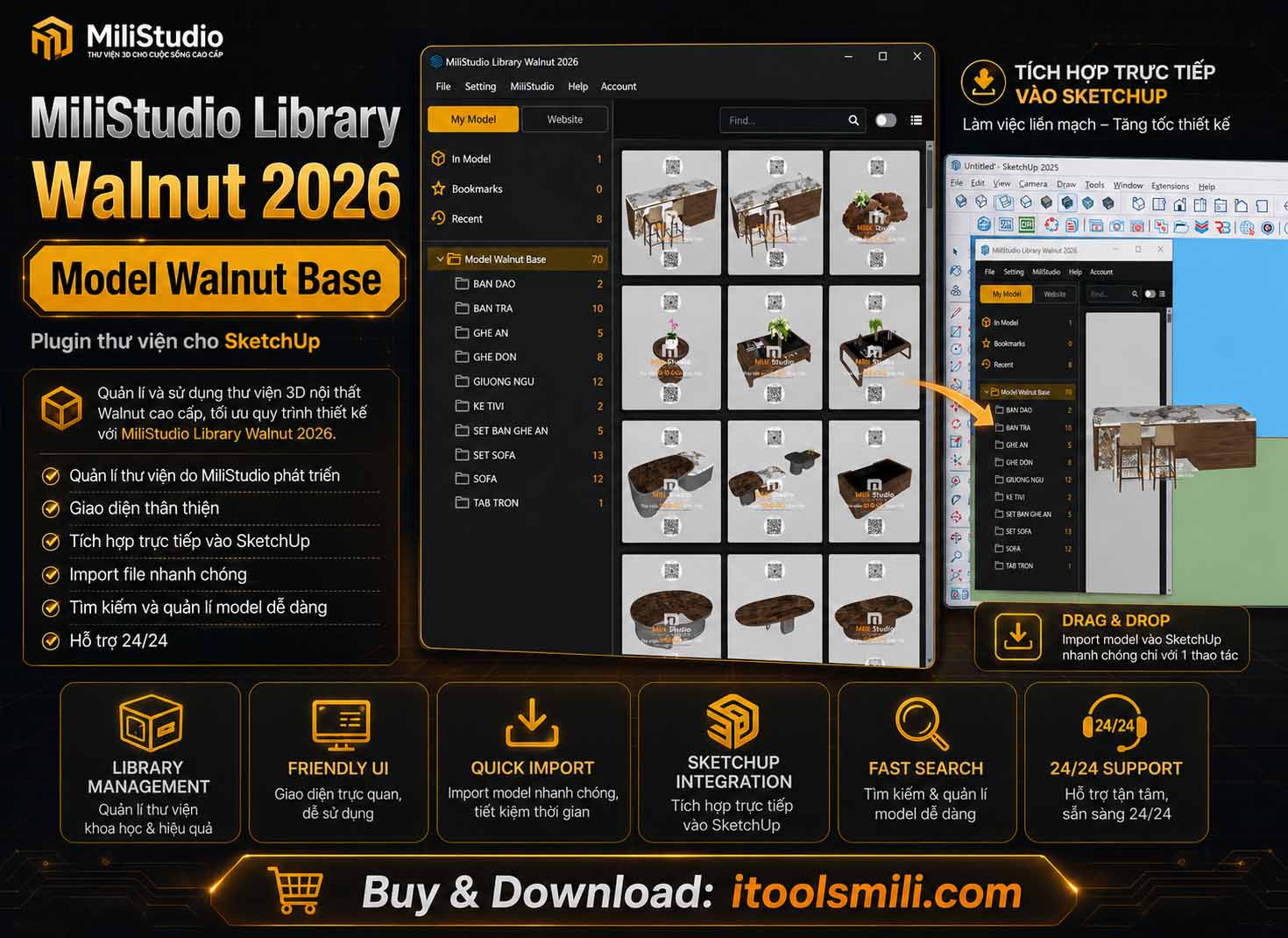
MiliStudio | Library Walnut là giải pháp quản lý thư viện mẫu (model) và vật liệu (material) gỗ óc chó cao cấp dành cho SketchUp. Chương trình giúp kiến trúc sư và nhà thiết kế nội thất tổ chức thư mục mẫu vẽ một cách khoa học, xem nhanh ảnh đại diện, tìm kiếm và chèn nhanh mô hình vào bản vẽ SketchUp đang thiết kế.
✨ Ưu điểm vượt trội: Không cần nhập thủ công từng file. Chỉ với tính năng chọn thư mục và tự động giải nén, chương trình sẽ tự động lập chỉ mục, trích xuất hình ảnh thu nhỏ đại diện và hiển thị giao diện kéo thả trực quan giúp tăng tốc thiết kế đến 300%.
1. Giao diện chính và Các thẻ danh mục
Giao diện của Library Walnut được chia làm hai khu vực chính: Thanh công cụ/Sidebar điều hướng bên trái và Bảng hiển thị thư viện bên phải.
- My Model / Website: Nút chuyển đổi nhanh giữa Thư viện ngoại tuyến (dữ liệu lưu trên máy tính của bạn) và Thư viện trực tuyến (các nguồn tài nguyên online do MiliStudio tuyển chọn).
- In Model: Hiển thị danh sách các Component hoặc Vật liệu đang thực sự hiện diện trong bản vẽ SketchUp hiện tại của bạn.
- Bookmarks (Yêu thích): Lưu trữ các mẫu hoặc vật liệu bạn thường xuyên sử dụng. Chỉ cần nhấn nút đánh dấu sao trên ảnh để lưu lại.
- Recent (Gần đây): Tự động ghi nhận lịch sử 50 đối tượng hoặc vật liệu bạn vừa thao tác gần nhất để có thể tái sử dụng ngay lập tức.
2. Quản lý Thư viện & Gắn Thư mục dữ liệu
Để đưa dữ liệu thiết kế từ máy tính của bạn vào tiện ích, sử dụng các tùy chọn trong trình đơn File:
- Add Folder…: Chọn một thư mục cục bộ chứa các file `.skp` (mô hình) hoặc hình ảnh vật liệu. Phần mềm sẽ quét và hiển thị toàn bộ cấu trúc thư mục con và tệp tin lên cây thư viện bên trái.
- Update Date Library (Cập nhật thư viện): Hộp thoại nâng cao cho phép bạn chọn một file nén dữ liệu (.zip, .rar, .7z) tải về từ hệ thống của MiliStudio và chọn thư mục giải nén.
- Phần mềm sẽ sử dụng tiến trình ngầm thông qua 7-Zip (hoặc PowerShell) để giải nén tệp tin.
- Sau khi giải nén thành công, chương trình sẽ tự động nhận diện các thư mục tiêu chuẩn như
Model Walnut Base, Model Walnut Plus, và Model Walnut Pre để lập chỉ mục và gắn trực tiếp vào cây thư mục hiển thị trên giao diện của bạn mà không cần thao tác thủ công.
3. Các Thao tác Chèn Đối tượng & Áp Vật liệu
Khi nhấp chuột vào một đối tượng hiển thị trong thư viện, bạn có các lựa chọn:
- Chèn trực tiếp (Interactive Placement): Nhấp chuột trái vào ảnh thu nhỏ của Model, đưa con trỏ chuột vào không gian 3D của SketchUp và nhấp chọn điểm đặt mong muốn.
- Chèn tại gốc tọa độ (Insert at Origin): Nhấp chuột phải và chọn chèn tại gốc tọa độ
(0,0,0).
- Chèn hàng loạt (Insert multiple): Chọn nhiều đối tượng và chèn đồng thời vào bản vẽ tại gốc tọa độ.
- Thay thế đối tượng đang chọn (Replace Selected): Chọn một hoặc nhiều Component Instance có sẵn trong bản vẽ, nhấp chuột phải vào mẫu trong thư viện và chọn thay thế để cập nhật định nghĩa component mới mà vẫn giữ nguyên vị trí, góc xoay và tỷ lệ (scale).
- Áp vật liệu thông minh (Paint Material): Đối với tab Vật liệu, bạn có thể nhấp trực tiếp để áp vật liệu, hiệu chỉnh kích thước vân gỗ (texture size) hoặc khóa tỷ lệ ảnh vân gỗ ngay trên thanh công cụ hỗ trợ.
4. Kích hoạt Bản quyền (Đăng nhập tài khoản)
Một số tính năng chèn mô hình nâng cao sẽ yêu cầu tài khoản đã mua bản quyền để kích hoạt sử dụng thiết bị.
- Khi chọn chèn mô hình lần đầu hoặc khi nhấp vào mục Account, một đăng nhập tài khoản sẽ hiển thị.
- Nhập thông tin Email / Tên đăng nhập và Mật khẩu đã đăng ký mua hàng tại website của MiliStudio để kích hoạt thiết bị hiện tại.
- Thông tin kích hoạt sẽ được lưu trữ cục bộ bảo mật và bạn có thể quản lý, kiểm tra thời hạn thuê bao, ID thiết bị hoặc đăng xuất bất kỳ lúc nào.