Library_Walnut_Sketchup
Library_Walnut_Sketchup $80.00 $380.00Price range: $80.00 through $380.00
Back to products
Smart_Modeling
Smart_Modeling Original price was: $13.52.Current price is: $7.16.

QuickDetail3D

About QuickDetail3D

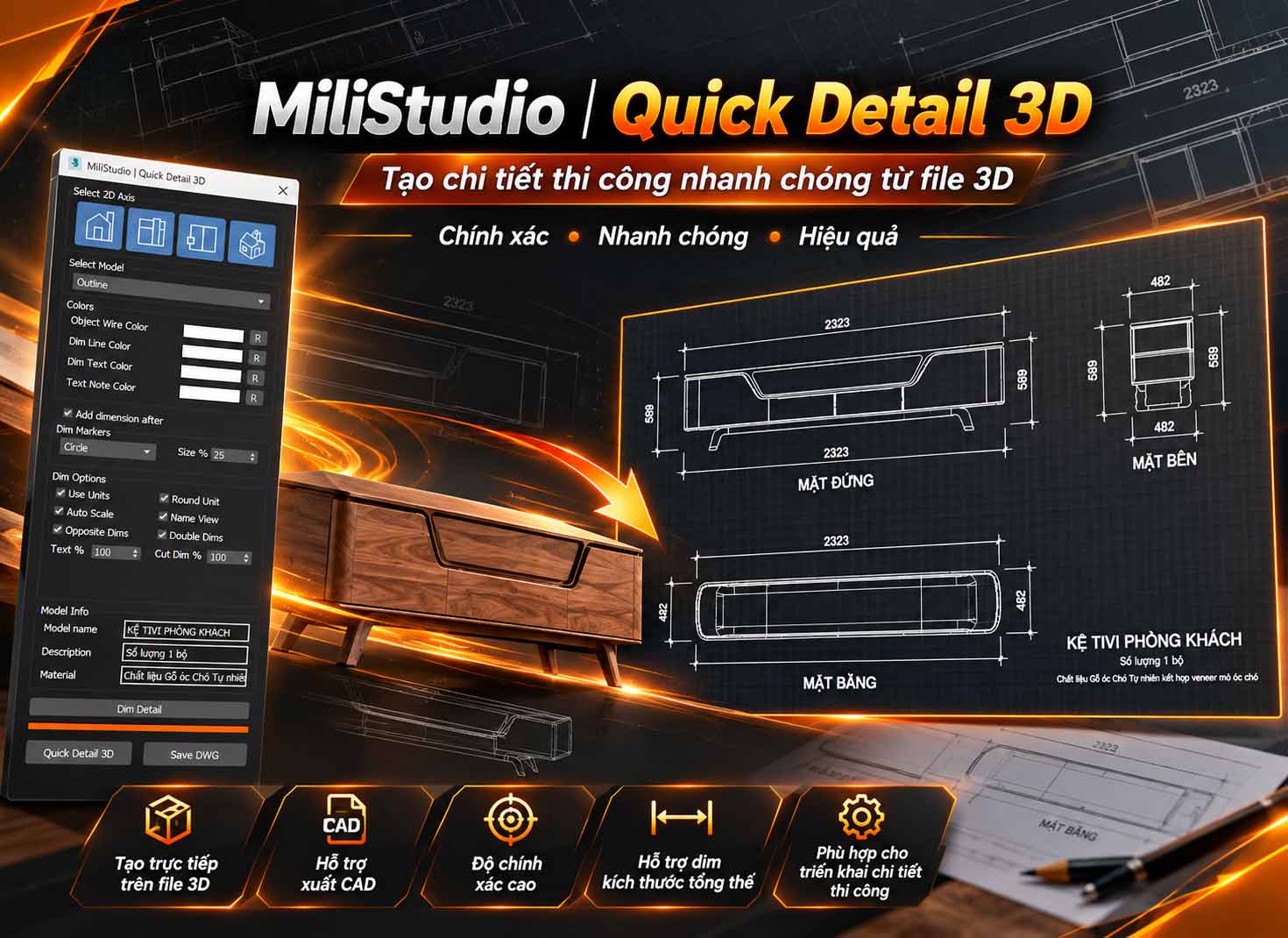
QuickDetail3D by MiliStudio is a tool for Autodesk 3ds Max that creates 2D drawings from 3D models, adds dimensions, and exports DWG files for further work in CAD.

  • Create projections along the X, Y, and Z axes, or enable all three with XYZ.
  • Choose Original, Outline, or Hight Outline extraction to suit your drawing.
  • Add horizontal and vertical dimensions, display units, round values, and automatically scale dimensions, labels, and spacing to the model.
  • Use Opposite Dims, Double Dims, and dimension markers: None, Slash, Circle, or Arrow.
  • Use Dim Detail to create dimension chains across the edges of a 2D projection.
  • Customize line, dimension, and note colors; add view names and model information.
  • Export selected drawing objects to DWG, save beside the MAX file, or send the drawing to AutoCAD.

Installation & Getting Started
  1. Open Autodesk 3ds Max and save your current scene.
  2. For the MZP installer, drag QuickDetail3D.mzp into the viewport and click Install.
  3. Open QuickDetail3D from the MILI STUDIO toolbar.
  4. For the source version in the MZP folder, choose Scripting > Run Script and select QuickDetail3D.ms. Keep the supplied resource folders in their original locations relative to the script.
  5. Sign in with your MiliStudio account when prompted. Use Account to view your license information or log out.
How to Use
  1. Select the 3D model you want to turn into a drawing.
  2. Enable X, Y, Z, or XYZ, then choose an extraction mode.
  3. Enable Add dimension after if needed, then set units, dimension markers, colors, and scale options.
  4. Enable Name View and enter model information as needed.
  5. Click Quick Detail 3D to generate the 2D projections, then check the lines and dimensions.
  6. Move a projection object to reposition its linked automatic dimensions and view label together.
  7. For detailed dimensions, use Dim Detail to draw a temporary guide across the projection edges.
  8. Select the drawing objects to export and click Save DWG to choose a destination.

Quick export: right-click Save DWG to save beside the MAX file. Use Ctrl + click Save DWG to send the DWG to AutoCAD. Save the MAX file before using either shortcut. AutoCAD is required to open the drawing with Send To CAD.

Watch the Video Guide

Copyright & Support

QuickDetail3D is developed by MiliStudio.

  • Website: thuviengooccho.com.
  • Products and support: itoolsmili.com.
  • For support, provide your 3ds Max version, the steps that caused the issue, and a screenshot through the MiliStudio website.

Original price was: $22.32.Current price is: $11.16.

Guaranteed Safe Checkout

Features & Compatibility

Additional information

Customer Reviews